
BARTCO

VMS WEB Studio ® – Firmware Upgrade

VMS WEB Studio ® – Firmware Upgrade 

As part of the latest VMS WEB Studio ®  release Administration Users now have access to remotely upgrade the firmware on all of your assets.
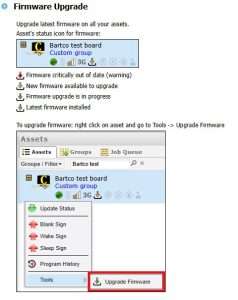
To request your access be updated with Administration Permissions & Firmware Upgrade feature please email service@bartco.com.au


VMS WEB Studio ® – Administration Permissions

VMS WEB Studio ® – Administration Permissions

Keeping track of your assets or managing your users has never been easier with this latest VMS WEB Studio ®  release.

You asked & we listened – you can now manage your Users & Assets through your VMS WEB Studio ® access. 

Administration Permissions allows the  Admin User to: 

  • Users: manage your existing users or create new users  using the Administration Tab 
  • Assets: manage your assets using the Administration Tab 

To request your access be updated with Administration Permissions please email service@bartco.com.au 


VMS WEB Studio ® – Cross Hire Function

VMS WEB Studio ® – Cross Hire Function

The latest VMS WEB Studio ® release allows you to Cross Hire assets in Hire Management to other companies who already have VMS WEB Studio ® account. 

This significant change now allows you to streamline the hire process for your customers – you now have total control for creating both Hire & Cross Hire Customers. 

  • Cross Hire your assets to another company using their unique code and create new hire customers with Cross Hiring. 
  • Cross Hire assets from another company by providing them with your company’s unique code, enabling them to appear on your existing Bartco login. 

For further information refer to the latest VMS WEB Studio ® manual